Product Design · iOS · Concept MVP
Making workout tracking easier during real gym sessions.
BYLD is a workout tracker that helps users create routines, log workouts, and understand their progress over time. The product was designed to make training feel more structured and manageable by giving users a clear place to organize routines, record sessions with less friction, and understand how their performance is improving.
How might we help gym users train with more structure and less uncertainty?
To define the problem, I focused on intermediate gym users — people who already understand the basics of training, but still need better tools to organize routines, stay consistent, and understand whether they are progressing.
The challenge was not simply logging a workout. Users needed a clearer way to prepare for training, record what they did with minimal friction, and review whether their effort was actually contributing to progress.
Staying structured
Intermediate users already have workout habits, but managing repeatable routines can still create unnecessary decisions before and during training.
Logging without interrupting the workout
Tracking sets, reps, weight, and exercises needs to be quick enough to support the session rather than become another task.
Understanding progress
Workout history alone is not enough. Users also need a simple way to understand consistency and how their performance is changing over time.
This defined the direction of the MVP:
Help users manage routines, log workouts with less friction, and review their progress after each session.
Which users should BYLD prioritize first and why?
To define the MVP audience, I segmented users by training experience.
Beginners
Need more guidance, confidence, and support with basic workout logging.
Future iterationIntermediate users
Need stronger routine management, consistency, and progress visibility.
PrimaryAdvanced users
Need deeper customization, analytics, and more flexible programming tools.
Future iterationI prioritized intermediate users because they already have established workout habits, but still benefit from better tools for organizing routines, staying consistent, and understanding their progress. Beginner-focused guidance and advanced functionality were intentionally moved to later iterations to keep the first release focused.
The MVP should support users who are still building consistency without overwhelming them with advanced training complexity too early.
What should the MVP include and what could wait?
The scope centered on the core workout journey:
Prepare Log Review
Users needed to be able to prepare for a workout, complete the session, and understand their progress afterward. This became the rule for prioritization:
If a feature did not help users complete a workout, follow a routine, or understand their progress, it was excluded from the initial scope.
Before including a feature, I asked:
- What must the user be able to do for the product to be useful at all?
- What is the minimum needed for that outcome to happen?
- Does the feature support routine management, consistent workout logging, or clearer progress visibility?
Start workout flow
Helps users begin training quickly without unnecessary setup friction.
Workout logging
Allows users to record exercises, sets, reps, weight, and duration.
Routine templates
Helps users organize repeatable workouts and train more consistently.
Workout history
Allows users to review previous sessions and maintain continuity.
Basic progress tracking
Helps users review exercise stats, workout records, and changes in performance over time.
The first release focused on the smallest set of features needed to support the full workout loop — prepare, log, and review.
What existing patterns should BYLD build on and where could it simplify?
I reviewed Strong, Hevy, and Lyfta to understand established patterns around workout logging, routine creation, progress visibility, and ease of use.
Strong
Strong provides efficient workout logging, clear set inputs, and familiar patterns for consistent trackers.
Opportunity for BYLD
Maintain a fast logging experience while making routine management and progress review easier to understand.
Hevy
Hevy combines workout history and routine management with social and community features.
Opportunity for BYLD
Keep the first release focused on individual training needs instead of introducing social functionality too early.
Lyfta
Lyfta uses stronger visual feedback around muscles and progress.
Opportunity for BYLD
Make progress more visual and motivating while keeping insights simple enough to support clear training decisions.
BYLD should build on familiar workout-tracking patterns while simplifying routine management, low-friction logging, and progress visibility.
How might we help users start a structured workout with less friction?
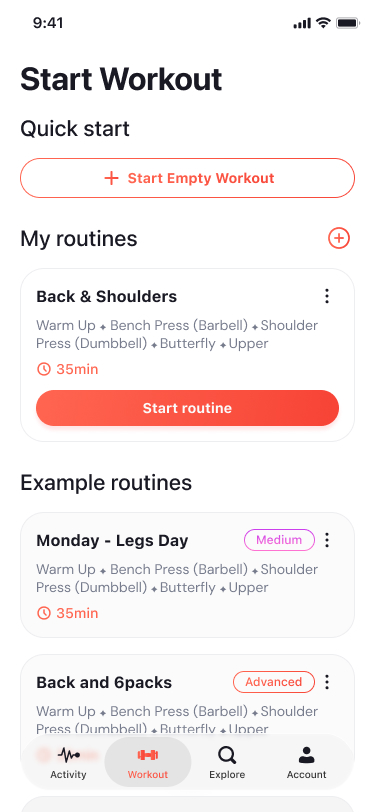
For repeat workouts, users can start directly from a predefined routine. This reduces decisions before training and helps users follow an already structured session instead of rebuilding their workout each time. The goal was to make the transition from planning to training feel immediate.
Choose a routine
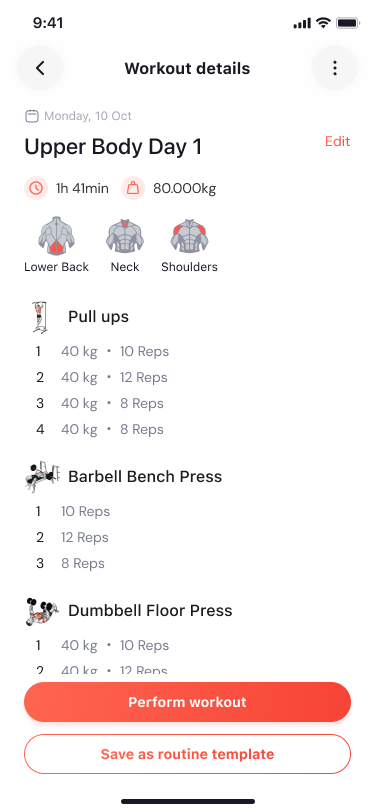
Review the workout
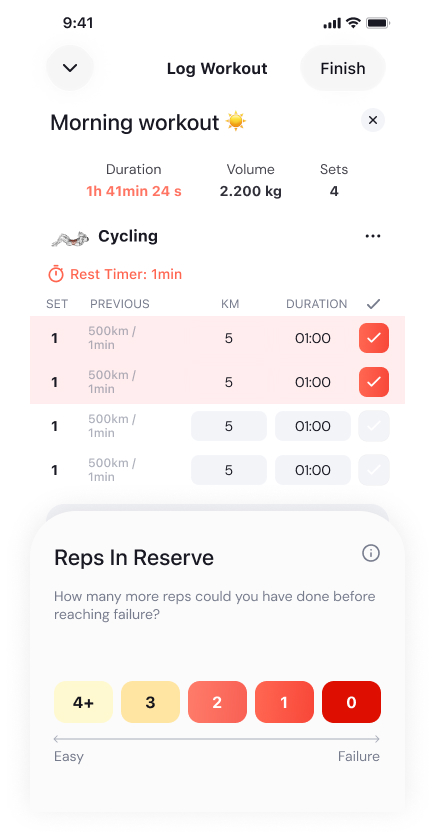
Log the session
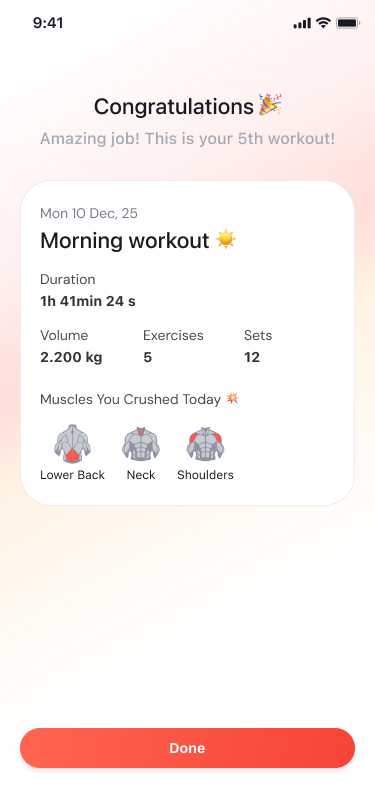
Complete the workout
How might we support flexible workout logging without adding unnecessary complexity?
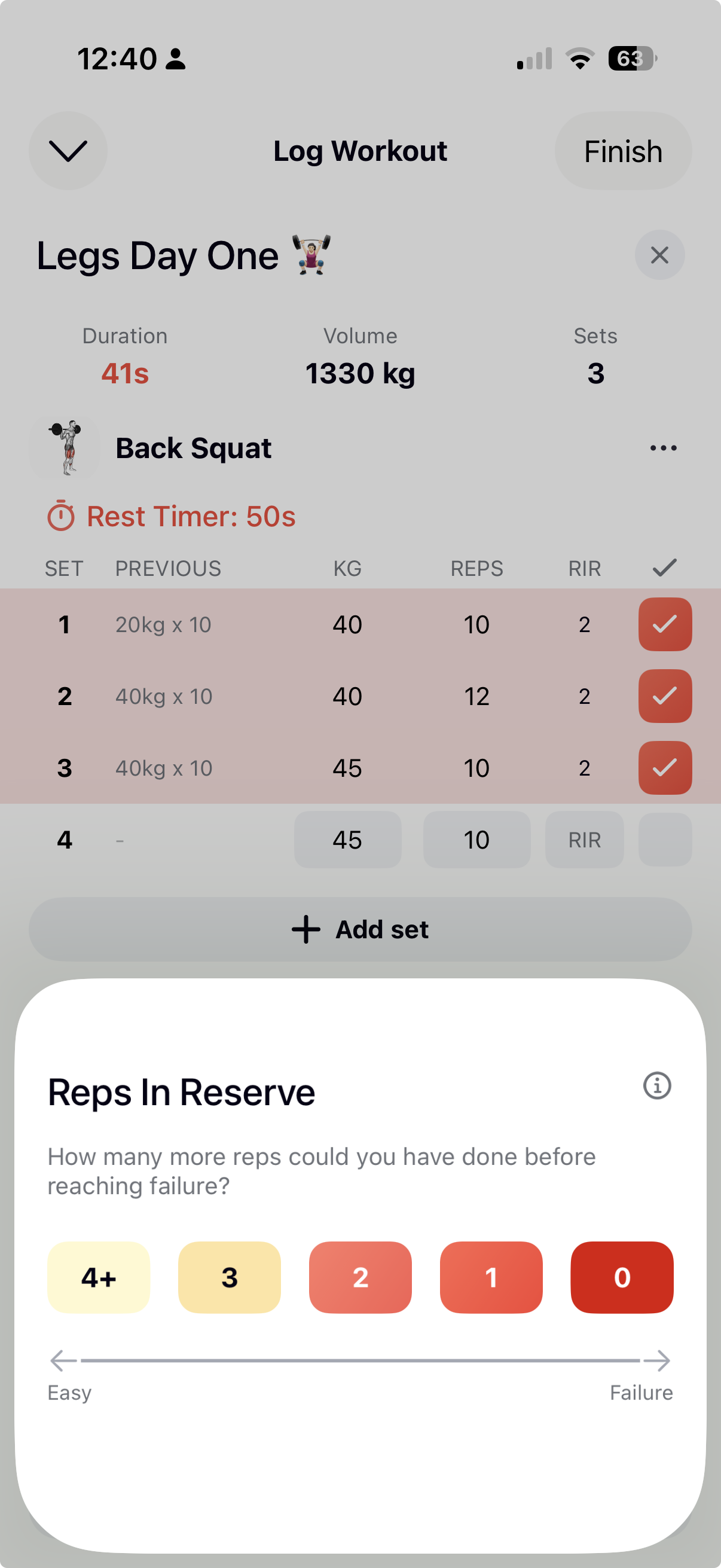
Not every workout follows a predefined routine. BYLD also allows users to start an empty workout, add exercises as they train, and record sets, reps, and weight during the session. This gives users flexibility while keeping the logging experience simple and focused.
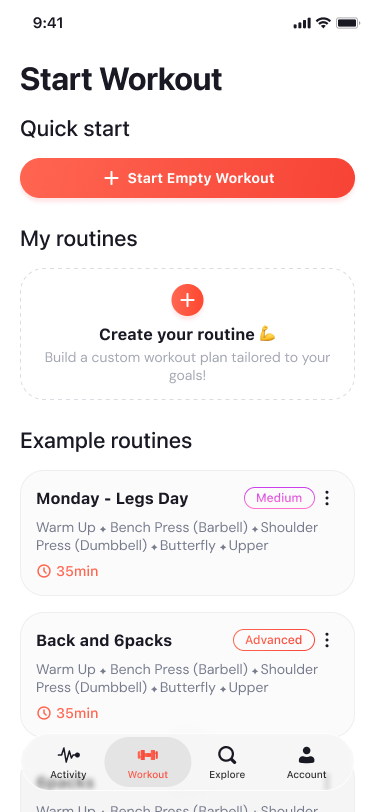
Start an empty workout
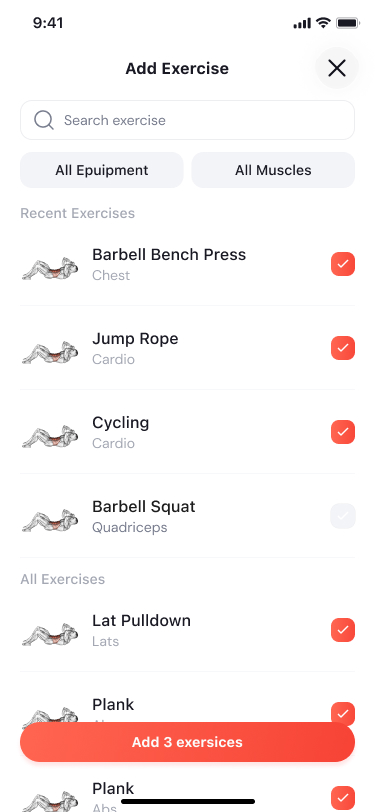
Find an exercise
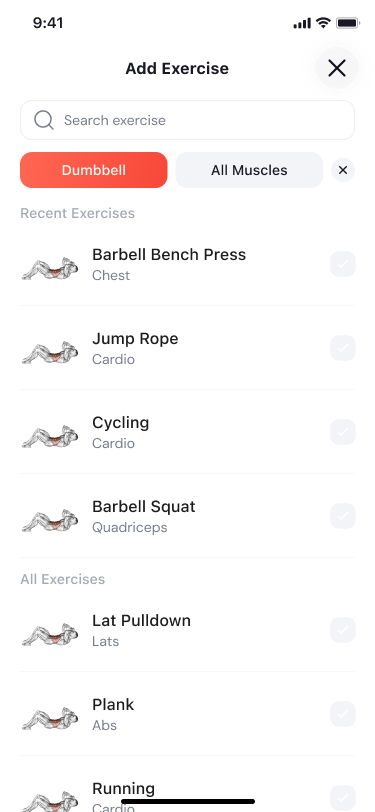
Choose exercises
Record sets and reps
How might we help users understand whether their training is moving forward?
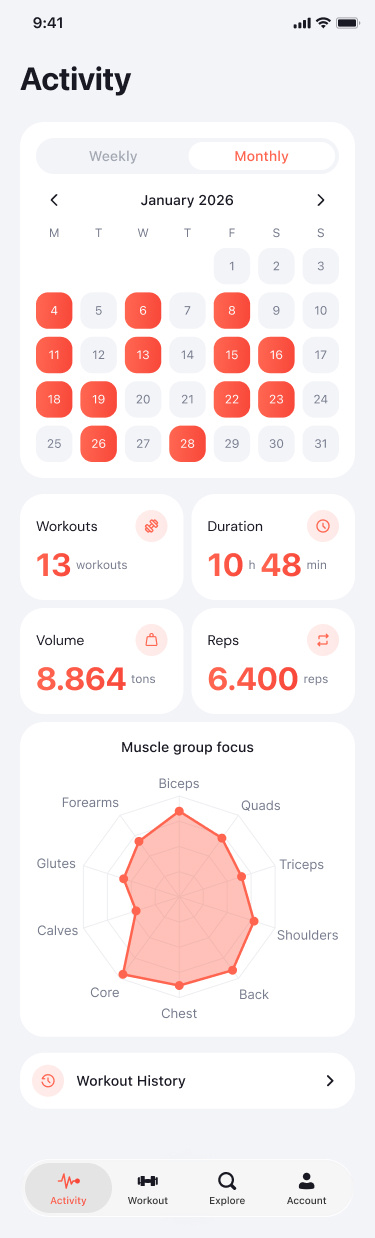
After completing a workout, users can review their training activity and exercise history over time. The progress experience helps users understand their consistency, review past performance, and see how their workouts are changing over time. The goal was to make progress visible without introducing advanced analytics too early in the MVP.
Training activity
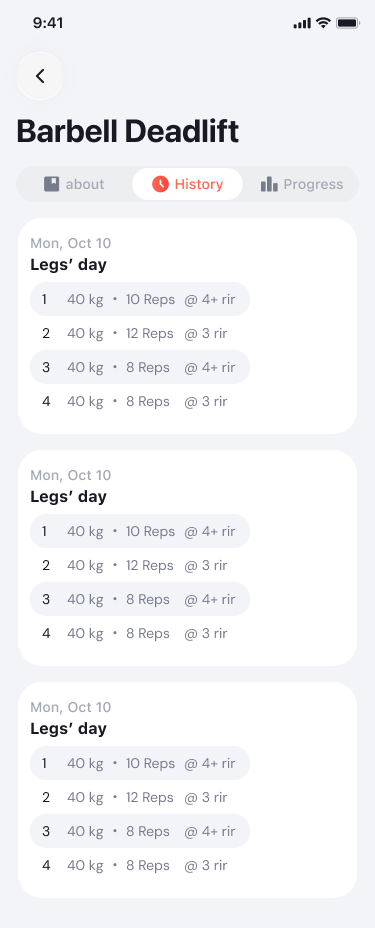
Exercise history
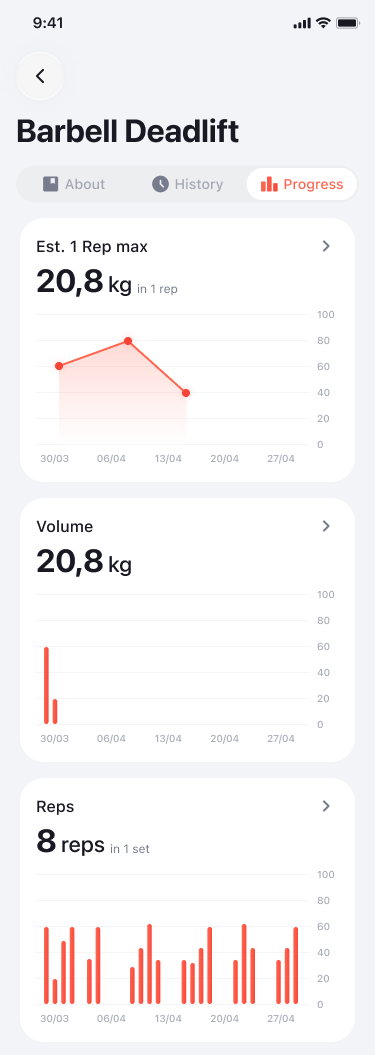
Exercise progress
How might we make BYLD easy to use when attention is limited?
BYLD is not primarily used while someone is sitting at a desk.
Users interact with it during active training — often between sets, while moving around the gym, and while their attention is divided.
That introduced practical constraints:
- Limited attention
- Short rest periods
- Sweaty hands
- Repeated phone checks
Clear primary actions
Important workout actions needed to be immediately recognizable without requiring users to scan the interface.
Simple layouts
The experience avoids unnecessary complexity while users are actively training.
Larger tap areas
Controls needed to remain easy to interact with in a physical environment where precision may be lower.
Persistent workout context
Live Activity support gives users access to important workout information without requiring them to repeatedly reopen the app.
/Screenshot_2026-05-07_at_19.18.25.png)
Did the experience still work during an actual workout?
I tested BYLD during my own workouts to understand how the experience performed in the environment it was designed for.
I also gathered informal feedback from a small group of gym-goers to compare my own experience with different training habits and identify repeated friction points.
Testing during active workouts exposed practical needs that are easy to miss when reviewing static screens — particularly quick access between sets, readable information at a glance, and simple interactions when attention is limited.
In a gym environment, speed and clarity matter more than complexity.
The experience needed to support quick logging, easy recovery of workout context, and minimal interaction effort throughout the session.
How would we know if the MVP supports the complete workout loop?
I defined success around the three core behaviours BYLD was designed to support:
Prepare Log Review
| Metric | Goal | What it signals |
|---|---|---|
| Start workout rate | Begin training | Whether users can start a session without unnecessary friction. |
| Workout completion rate | Reduce logging friction | Whether users can successfully complete a logged workout. |
| Repeat workout rate | Support consistency | Whether users return and continue training with BYLD. |
| Routine creation / usage | Routine management | Whether users create, reuse, and manage routines as part of their training behaviour. |
| Progress / history views | Progress visibility | Whether users return to review their performance over time. |
The MVP would be successful if users can start workouts quickly, use routines consistently, complete logging with minimal friction, and return to review their progress.
How could BYLD evolve after validating the core workout experience?
Future iterations will explore: